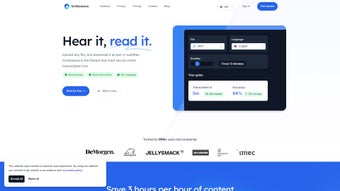

Download Scribewave – AI Transcription, Subtitle Generator & Video Waveform Tool
Overview
Scribewave is a cloud‑based, AI‑powered transcription and subtitle platform that turns any audio or video file into accurate text, multilingual subtitles, and even share‑ready videos with dynamic waveforms. Built for creators, marketers, educators, and enterprises, Scribewave supports more than 90 languages and dialects, guaranteeing high‑precision results thanks to a proprietary speech‑to‑text engine that continuously learns from real‑world usage. The service removes traditional limits: there are no file‑size caps, no duration restrictions, and virtually any media format is accepted.
Once uploaded, the AI instantly generates a time‑coded transcript, highlights spoken paragraphs for easy editing, and offers one‑click export to Microsoft Word, Google Docs, SRT, VTT, or plain text. Beyond transcription, Scribewave automates subtitle creation in the source language or any of the supported translations, giving users the flexibility to reach global audiences. A standout feature is the “Audio‑to‑Video” converter, which layers a customizable waveform over the original audio and synchronizes the subtitles, producing a ready‑to‑post video ideal for social platforms like Instagram, TikTok, or LinkedIn.
The interface is clean, the workflow intuitive, and the platform complies with GDPR, providing daily backups and secure data handling. Whether you need to caption a corporate webinar, caption a YouTube tutorial, or create eye‑catching teaser clips, Scribewave offers a fast, reliable, and cost‑effective solution.
Key Features That Set Scribewave Apart
- AI‑driven transcription supporting 90+ languages and regional dialects.
- Unlimited file size and duration – upload any audio or video without hidden caps.
- Real‑time editor that highlights spoken paragraphs, allowing instant corrections.
- One‑click export to Microsoft Word, Google Docs, plain text, SRT, and VTT formats.
- Automatic subtitle generation with multilingual translation options.
- Audio‑to‑Video conversion that adds customizable waveforms and synced subtitles.
- Batch processing for large‑scale projects, ideal for enterprises and agencies.
- Secure cloud storage with daily backups and GDPR‑compliant data protection.
- Collaboration tools – share transcripts with teammates via secure links.
- Integrations with popular platforms such as Google Drive, Dropbox, and Zapier.
Each of these capabilities is designed to streamline the content‑creation pipeline. For example, the real‑time editor eliminates the tedious back‑and‑forth of traditional transcription services: you can see each paragraph highlighted as the AI processes the file, click to edit, and instantly see the changes reflected in the subtitle preview. The audio‑to‑video feature is particularly valuable for social media managers who want to repurpose podcasts or voice‑overs into engaging visual posts without hiring a video editor. Because the service runs entirely in the browser, there’s no need to install heavyweight software, and updates are applied automatically, ensuring you always have the latest AI models and security patches.
Installation, Usage Instructions & Compatibility
Scribewave is a web‑app, which means you don’t download a traditional installer. Getting started is as simple as visiting scribewave.com, creating a free account, and uploading your first file. Here’s a step‑by‑step guide:
- Create an account: Click “Sign Up”, provide an email address, and set a secure password. You’ll receive a verification link to activate the account.
- Choose a plan: Scribewave offers a free tier with 30 minutes of transcription per month and paid plans for unlimited usage. Select the plan that matches your needs.
- Upload your media: Drag‑and‑drop any audio or video file (MP3, WAV, MP4, MOV, AVI, etc.) onto the dashboard or use the “Upload” button. The AI begins processing instantly.
- Edit the transcript: Once the AI finishes, the transcript appears in the editor with each spoken paragraph highlighted. Click any segment to edit, add timestamps, or adjust speaker labels.
- Generate subtitles: Choose “Create Subtitles”, select the target language, and let Scribewave auto‑translate. Review the subtitle preview and make adjustments if needed.
- Export or share: Use the “Export” dropdown to download the transcript in Word, Google Docs, SRT, or VTT. For videos, click “Convert to Video”, customize the waveform color, font, and background, then download the final MP4.
- Collaborate: Generate a shareable link to let teammates view or edit the transcript without creating separate accounts.
Compatibility (itemprop="operatingSystem"): Because Scribewave runs in any modern browser, it works on Windows 10/11, macOS (Catalina and later), Linux distributions, as well as mobile browsers on Android 8+ and iOS 13+. The platform is optimized for Chrome, Edge, Firefox, and Safari, delivering the same performance across devices. No additional plugins or extensions are required, making it a truly cross‑platform solution.
Pros & Cons – A Balanced Look
Pros
- High accuracy across 90+ languages thanks to advanced AI.
- No file‑size or duration limits – ideal for long podcasts or webinars.
- Instant editing with paragraph highlighting saves time.
- One‑click export to multiple formats simplifies workflow.
- Audio‑to‑video conversion with customizable waveforms for social media.
- Secure cloud storage, daily backups, and GDPR compliance.
- Free tier available for light users and easy upgrade path.
- Browser‑based, no installations, and auto‑updates.
Cons
- Requires a stable internet connection; offline transcription not supported.
- Free tier limited to 30 minutes per month – may be insufficient for frequent users.
- Advanced formatting (e.g., speaker diarization) may need manual tweaks.
- Customization of waveform aesthetics is limited to preset themes.
- Pricing for premium plans can be higher than some niche transcription services.
Frequently Asked Questions
Is Scribewave really free to use?
Scribewave offers a free tier that includes up to 30 minutes of transcription per month. This is perfect for occasional users or for testing the platform before committing to a paid plan.
How accurate is the AI transcription for less common languages?
Accuracy varies by language and audio quality, but Scribewave’s models have been trained on millions of hours of multilingual speech. For most major languages, you can expect 95%+ accuracy; for rare dialects, a quick manual review is recommended.
Can I edit subtitles directly within the platform?
Yes. After generating subtitles, Scribewave displays a synchronized preview where you can adjust timing, correct wording, or change the style before exporting to SRT, VTT, or embedding in a video.
What security measures protect my uploaded files?
All files are transferred over TLS 1.3, stored encrypted at rest, and backed up daily. Scribewave complies with GDPR, giving you full control over data retention and deletion.
Is there an API for developers who need bulk processing?
Yes. Scribewave provides a RESTful API with endpoints for uploading media, retrieving transcripts, and generating subtitles programmatically. API keys are available on paid plans.
Conclusion – Should You Download Scribewave?
In a market flooded with transcription tools, Scribewave distinguishes itself through its truly unlimited file handling, multilingual depth, and the unique audio‑to‑video conversion that adds a visual layer to plain audio content. The browser‑based design means you’re always on the latest AI model without manual updates, and the GDPR‑compliant architecture assures peace of mind for businesses handling sensitive recordings. While the free tier is modest and offline use isn’t possible, the feature set justifies the subscription cost for professionals who need speed, accuracy, and a streamlined workflow from raw audio to polished, subtitle‑rich videos.
If you regularly create webinars, podcasts, e‑learning modules, or social‑media snippets, download Scribewave today and experience a faster, more flexible transcription process. Sign up for the free plan to test the limits, then upgrade to unlock unlimited minutes, batch processing, and API access. Your content will be more accessible, searchable, and ready for global distribution in minutes—not hours.



.png)



